 Extension for IDA integration into Firefox
Intercept downloads for Internet Download Accelerator, download a file or a group of files from the context menu.
Download from Firefox with IDA just by clicking the link. You can enable or disable link interception in the extension menu. You can also set the minimal file size to be downloaded using IDA.

Mozilla Firefox extension adds ability to start download or a group of downloads from theFirefox's context menu. After you install the extension, the Internet Download Accelerator sub-menu with Download and Download All menu items will be added to the Firefox's context menu.
After installation you will need to restart Firefox. Now after clicking on a link (link example) you'll see two new items in the context menu:

choose Download if you want to download the selected file, Download all links if you want to download a group of files from the page or Remote Download if you want to download file remotely.
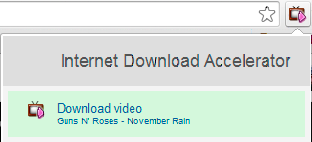
If you visit a site with videos, which can be downloaded by IDA, the extension button will change its appearance. You can click it and choose Download video to download videos with IDA.
You can select text, right-click to open the context menu and choose "Search selection on mytopfiles.com". You will get the page with search results immediately where you can download files.
For more information on IDA integration with Firefox please see IDA Help system.
!!! Extension are only supported on Firefox 50 and higher.
To download the latest IDA version or get more detail on IDA please visit: westbyte.com/ida.